Home › Features › RIR & RPE tracking
RIR and RPE tracking that sets your next target
Plenty of apps have an RIR column. Almost all of them stop there: you type a number, it sits in your history, and next week you still work out what to lift by yourself. In TRY the number does a job. The reps you leave in the tank are treated as reps you could have done, and they change what the app asks of you next session.
The short version
You log how close to failure a set was — as reps in reserve (RIR) or on the 1–10 RPE scale, your choice per exercise. Both are optional on every set.
TRY counts the reserve as real work. Eight reps stopped at RIR 2 is treated as a ten-rep capacity at that weight, not eight. That estimate of what you can do, plus a small weekly progression and a set of guardrails, becomes the weight and reps waiting in the next session — and the RIR target itself walks down across a training block, with deload weeks built in.
Logging is free. The targets are part of the Pro tier. Details, and the things it does not do, below.
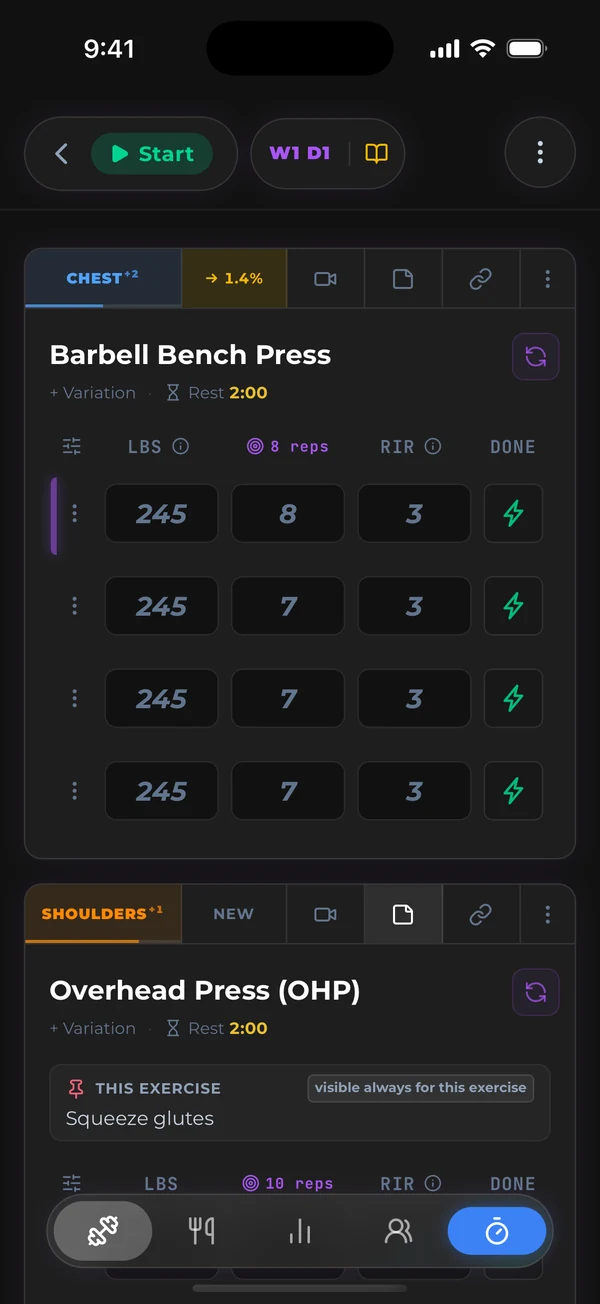
RIR vs RPE, in one minute
RIR is reps in reserve — how many more reps you could have done. In the app’s own words: “2 means you stopped with 2 reps left in the tank; 0 means nothing left.” RPE is rate of perceived exertion, how hard the set felt from 1 to 10, where 10 means you could not have done another rep. For lifting they are the same measurement read from opposite ends: RPE = 10 − RIR, so RPE 8 is RIR 2.
TRY lets you use either. Pick the one you think in, per exercise; RPE gets half-steps (an 8.5 is a real entry) and RIR moves in whole reps. Underneath, both are converted to the same reps-in-reserve figure, so switching scales mid-program costs you nothing.
How you log it
- It is off until you want it, and there are three ways to turn it on. A new exercise records weight and reps. Add RIR or RPE to one exercise from its field picker (the same place you would add distance, incline or a pain level), switch it on for the whole workout from the workout menu’s Intensity Tracking setting (Off, RIR or RPE), or set it once for a whole program in Program Studio’s progression settings, where the weekly targets attach.
- It is one tap per set. A number box in the set grid, or a drag slider in the full-screen set view when you are mid-workout with sweaty hands.
- It never blocks you. A set with no RIR is still a complete set. Skip it on warm-ups, log it on the sets that matter.
- The program builder can do it for you. Tell it you train by RIR (or RPE) and the field is on across every exercise, with the weekly targets attached.
What the app does with the number
- It counts the reserve as reps you could have done. Every set you log is turned into an estimate of your current one-rep max using a published formula (Wathan’s), with your reps in reserve added to the reps you did. That is the whole trick: a set stopped at RIR 3 and a set taken to failure at the same weight and reps are recorded as different amounts of strength, because they are.
- It anchors to your best demonstrated capacity, not your last session. The highest estimate in your recent history is the anchor. One flat day does not drag your targets down; if a session comes in more than a few percent under your trend, the app projects from the trend instead of the bad day.
- It adds a small, deliberate progression. By default the target capacity grows about 2% a week, then the app solves for a weight and rep count inside the exercise’s rep range that matches. That is what shows up pre-filled on set one.
- It sizes the later sets for fatigue. Sets two onward are stepped down from set one using how many reps you are doing and how long you rested. The between-set recovery rate is learned per muscle group from your own logs over roughly twenty workouts, starting from a sensible population default.
- It has guardrails. A target is never more than a fixed margin above what you have actually shown you can do — about 7% on heavy, low-rep work, widening to about 12% at high reps — and the fatigue maths can only ever nudge a prescription by a few percent. The system is built to be slightly cautious rather than to flatter you.
- It re-plans while you are lifting. Type a different weight into a set and the reps re-derive from the same capacity estimate on the spot. Log a harder-than-expected RIR on set two and the remaining sets’ targets move to match; the RIR you typed stays yours.
- It notices a stall. If your capacity on an exercise stops moving for two sessions, the app adds a set rather than quietly asking for the same thing again.
Across a block: the RIR ramp and deloads
Logging RIR is the input. The target RIR is the other half, and TRY manages it at the program level in the way hypertrophy blocks are usually written:
| Week type | Target RIR | What that means |
|---|---|---|
| Accumulation | 3 or more | Volume goes in, sets stay well short of failure |
| Intensification | 1–2 | Same movements, closer to the edge |
| Peak | 0 | The block’s last training week, taken to failure |
| Deload | 4 | Weights scaled down, effort backed right off |
Within a block the target steps down one RIR at a time and always lands at 0 on the final training week, so the periodisation runs without you keeping count. Deload weeks lower the pre-filled weights and carry no intensity target at all. If a coach (or you) types a specific RIR onto a set, that number wins over the weekly ramp and is never rewritten.
Separately, the app suggests when a deload is due based on your experience level — more often the more advanced you are. That suggestion is a calendar, not a verdict on your last week; it is there so you plan the easy week instead of getting ambushed by it.
What it does not do
This is the part most feature pages leave out, and the part a lifter who trains by RIR will actually care about.
- An unlogged set is assumed to be at failure. If you skip RIR, the app has nothing to add, so it treats the reps you did as all you had. Your targets run conservative rather than wrong — but the more sets you tag, the sharper they get.
- It does not adjust for exercise order. Whether your bench came first or fourth, the target is the same. We measured what order does to capacity and it sits inside normal day-to-day variation, so pretending to correct for it would be noise dressed up as precision.
- There is no RIR-over-time chart. Your RIR history is kept and it feeds your strength trend on every lift, but if you want to graph your effort scores on their own, that view does not exist yet.
- It still needs an honest number. RIR is a self-report. Guess low every set and the app will believe you and push. Most lifters find they get better at calling it within a few weeks; the app cannot do that part for you.
What’s free and what’s in the Pro tier
| Free tier | Pro tier | |
|---|---|---|
| Log RIR or RPE on any set, unlimited history | Yes | Yes |
| Choose RIR or RPE per exercise, half-step RPE | Yes | Yes |
| Pre-filled weight and rep targets from your RIR | No | Yes |
| Weekly RIR ramp and deload weeks in programs | Yes | Yes |
| Strength trend and one-rep-max charts on every lift | No | Yes |
Free is a real logger with no card and no set limit, so you can build the RIR habit at zero cost and decide about the targets later. The Pro tier is $11.99 a month or $119.99 a year. New members can get $95.99 a year in their first week, kept for as long as they stay subscribed.
Common questions
Should I log RIR or RPE?
Whichever one you naturally think in. They are the same measurement, RPE = 10 − RIR, and the app treats them identically. If you are new to either, RIR is the easier one to be honest about: “could I have done two more?” is a concrete question.
Do I have to log it on every set?
No. It is optional on every set and off by default. Log it on your working sets and skip the warm-ups; a set without a value is simply treated as taken to failure.
What if I get it wrong?
One wrong entry barely moves anything, because targets anchor to your best recent capacity and can only sit a fixed margin above what you have demonstrated. A run of optimistic entries will push you harder; a run of pessimistic ones will hold you back. Either way, the next honest set corrects it.
Does the program builder set RIR targets?
Only if you ask it to. Say you train by RIR or RPE and it turns the field on across the program and applies the weekly ramp above. Say “take it close to failure” and that becomes a note on the exercise, not a number — it does not guess a scale you did not ask for.
Log RIR for a week, free
Unlimited logging, no card. Tag your working sets with RIR and see what your strength trend looks like when the reps in the tank are counted.
Get TRY FitnessFree forever tier · Pro $11.99/mo or $119.99/yr · $95.99/yr ($8.00/mo) if you subscribe within 7 days of signing up
This page describes how TRY Fitness behaves as of 5 September 2026, checked against the app’s progression logic on that date. Defaults such as the weekly progression rate and the guardrail margins are the shipped values and may be tuned in future versions. Spotted something that no longer matches the app? Tell us and we’ll fix it.